


PLAUD
PLAUD NotePin Lunar Silver AI Voice Recorder
PLAUD NotePin Lunar Silver AI Voice Recorder
Couldn't load pickup availability


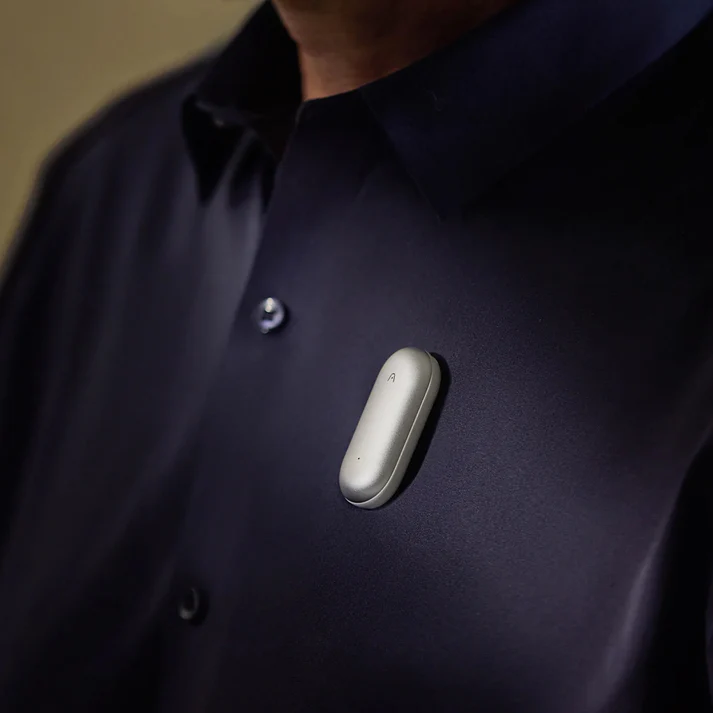

Key innovations overview

Wear it your way
Choose from four versatile styles that let you keep it on all day and capture notes completely hands-free.

Wearable AI note taker to maximize productivity
Capture
Audio | Highlight | Text | Image

Extract
112 Languages | Speaker Labels | Multidimensional Summaries

Human-AI alignment in real time
Multimodal input
Bring together what you say, hear, see, and think

AI Transcription
Reliable transcripts, whoever speaks, in any language

Multidimensional Summaries
One conversation. Infinite perspectives.

Ask Plaud
Turn every question into a trustworthy answer

AI note taker for all professionals

Enjoy a free Starter Plan
Need more? Upgrade anytime to Pro Plan or Unlimited Plan for extended transcription minutes.

Why choose Plaud NotePin?


*estimate based on an average of 1 hr saved per work day from post-meeting and related work.
**estimate based on an weighted average of AU salaries divided by the amount of time saved per year.

Specification
Dimensions
51 x 21 x 11 mm
Weight
16.6 g
Battery
270mAh
Connect
BLE / Wi-Fi / Cable
Microphone
2 MEMS
Charging Time
2 hours
Storage
64G
Effective Recording Range
3m
Does the Plaud NotePin support phone call recording?
The Plaud NotePin doesn't have a V.C.S (Vibration Conduction Sensor), so it doesn't support phone call recording.
Is the Plaud NotePin compatible with the Find My feature on my iPhone?
Yes, you can add your NotePin to the “Find My” feature. It will allow you to locate your NotePin when it is lost. To do that, please follow the steps below:
- Tap your Plaud NotePin on the top-left and go to the device settings page.

2. Swipe down and tap “Find My”.

3. Tap “Add NotePin to Find My” and follow the instructions to add your NotePin to Find My.

How to reset the Plaud NotePin?
To reset your Plaud NotePin, please charge the Plaud NotePin and long-press the record button for 12 seconds.
Can I wear Plaud NotePin if I have a pacemaker?
We recommend consulting your doctor or the pacemaker manufacturer before using Plaud NotePin, as it contains electronic components and magnets that may affect implanted medical devices.
How do I find the serial number of Plaud NotePin?
The Serial Number is a unique identifier used for product management, device maintenance, and warranty services. If you're searching for the Serial Number (SN) of your Plaud NotePin, you can find it in the following locations:
- Inspect the box that the Plaud NotePin arrived in. The SN is imprinted on a label.

- Open the Plaud app and enter the device settings page. The SN is displayed on this page.

- You can also find it on the back of the Plaud NotePin.
How to bind my Plaud device?
After creating your Plaud account and logging in successfully, please follow these steps to bind your device:
- Open the Plaud App and click the “Connect” button located in the top left corner.
- Select the Plaud device labeled "Plaud NotePin".
- Press and hold the record button on the NotePin until the white light flashes. This indicates that the NotePin is ready for connection.
- The App will start searching for the NotePin. Once it appears in the list of devices, you can connect to it.
How to start recording?
Press the center of the device until you feel one vibration to start recording.
To stop recording, press the center of the device again until you feel two vibrations.
How to transcribe my audio file?
After you finish recording, the audio will be saved in your device automatically.
To do a transcription:
- Connect your Plaud device to the Plaud App.
- Your audio files will be uploaded automatically after a successful connection.
- Enter the file and tap "Generate". Choose the summary template, language, and AI model. Then click "Generate Now" to start the transcription.
How to generate a summary and mindmap?
After the transcription is complete, the summary and mind map are automatically generated.
Plaud App automatically creates mind maps based on your summary, enhancing visual understanding.
What is your Warranty and After-sales Policy?
1. Hardware
Customers of the Plaud device enjoy a 12-month warranty service starting from the date of purchase. To avail of the warranty service, customers must provide a valid device serial number.
The warranty service applies if:
- The Recorder is not dismantled, repaired, maintained, resold, or modified without permission.
- The Recorder is not operated in an abnormal environment.
- The Recorder is not damaged due to misuse or violation of the user's guide.
- The Recorder has not experienced collision, falling, bending, or liquid leakage due to improper storage or environmental factors.
2. Annual Membership & Transcription Quota
If you have purchased an Annual Membership or a Transcription Quota from plaud.ai but haven't used or activated it, you are eligible for a full refund within 30 days of the purchase date. Please contact customer support with your order details. Refunds are processed within 5–10 business days upon approval. Activated or used products are not eligible for refunds.
3. Accessories
Plaud accepts all unused accessory returns within 30 days of delivery. To begin the return process, contact customer support and provide your order number.